

Search on Google using an image
Have you ever come across a picture you wanna know more about? It’s name, similar images, or websites that have that image? And did you know that it’s totally possible for you to use an image to make a search?…
Have you ever come across a picture you wanna know more about? It’s name, similar images, or websites that have that image? And did you know that it’s totally possible for you to use an image to make a search?…

Third installment in our series! The next special character we are going to talk about is the “OR” or “|” operator. If we recall a little bit about how Google works, when searching for more than one word, for example apartment…

The internet is massive. I think we all know that. So, whenever we search the web for something specific, it can take us a while to find the webpage that has just what we need within all the results we are given. To…

Did you know there’s a way for you to navigate Internet without being recorded on your Browse’s Search History? It’s called Incognito mode, it’s an option available in Google Chrome for you to visit websites that you want no one…
The following tricks are useful when we are searching for specific words within an article’s text or in the title of a new, for example. The tips will be searching for specific words in a text, title, URL or the…
Continue reading the "Search for Words in a Website’s Text, Title, or URL." »

Let’s say we need to get results to a web search in a certain language, but we made such search in another language. I mean, imagine you heard or read about certain phrase in a language you can’t understand. But…
Continue reading the "Translation for Web Search Results on Google" »

We can increase the speed to locate our needs on a search engine using multiple windows and tabs simultaneously in our searches. Opening new windows. Open new windows using the menu: File> New> Window from your browser. We can…
Here are three useful tips that will make it easier the usage of search engines. It is really important that when you search for something on the internet, you use specific words to describe what you are looking for. When you…
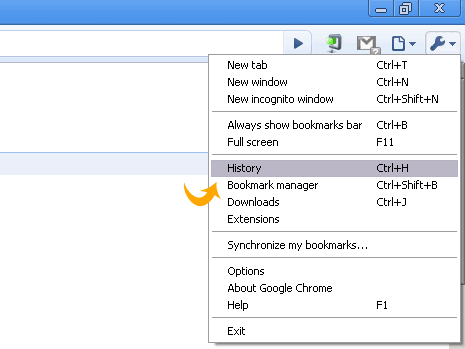
You can easily find and reopen a web page choosing the “Search History” or called just “History” option in the tool bar on your search engine. A list of the links you’ve visited will be displayed where you can see all…

1.Install the addon formLimiter and then look it up on the puzzle icon in the top right 2.Click on formLimiter in the option Set limit 3.A window will open, click on date & time 4.Now, you can select a specific…
Continue reading the "Date and time limits on Google Forms" »